Onsitego Blog
  • Contact Us
No Result
View All Result
  • Home
  • News
  • Reviews
  • Buying Guide
  • Explainers
  • How-To
Onsitego Blog
  • Home
  • News
  • Reviews
  • Buying Guide
  • Explainers
  • How-To
No Result
View All Result
Onsitego Blog
No Result
View All Result
Home News

Microsoft Windows 11 Gets A Way To Restore Apps Through Microsoft Store

Amanpreet KaurbyAmanpreet Kaur
26/05/2022
in News
0 0
0
Microsoft Windows 11 Gets A Way To Restore Apps Through Microsoft Store
WhatsAppFacebookTwitter

Last Updated on May 26, 2022 by Anu Joy

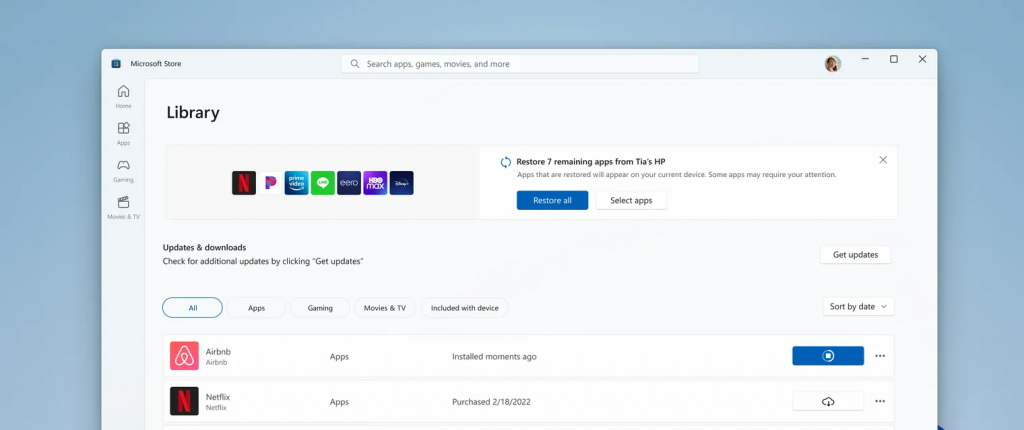
Microsoft announced at its annual Build developer conference that it will soon start testing a new feature to make it easier for users to restore apps onto a new Windows 11 PC. The existing Microsoft Store does not offer an automatic way to restore apps. Therefore, users have to resort to manually installing apps from their library. Notably, the software maker will soon start testing the feature in the Windows Insider channel.

Table of Contents

Toggle
  • An Easy Way For Windows 11 Users To Restore Apps To A New PC
    • Subscribe to Onsitego

An Easy Way For Windows 11 Users To Restore Apps To A New PC

Microsoft Windows 11 Gets A Way To Restore Apps Through Microsoft Store

Subscribe to Onsitego

Get the latest technology news, reviews, and opinions on tech products right into your inbox


    According to Giorgio Sardo, General Manager of the Microsoft Store, the upcoming feature will help customers automatically restore apps that were previously installed from the Microsoft Store to their new Windows device. He further added that the feature will help developers retain their customers without having to remind them to re-download their app.

    Also Read: Microsoft Windows 11 Is Getting Third-Party Widgets Soon

    Also Read
    Microsoft Windows 11 Update Will Bring Notifications Feature For Widgets

    If you switch PCs quite often, the ability to restore apps will help you transition quickly and seamlessly to the new machine. It will also be useful to developers who use virtual machines and multiple devices regularly. In the absence of the restore feature, users have to rely on third-party package managers for the same.

    However, there is a catch—Microsoft is only going to restore apps that originate from the Microsoft Store. For applications such as Google Chrome, you’ll have to manually re-install it. For the restore feature to make a significant impact on productivity, we’ll need to see more apps in the Microsoft Store. The firm is trying to address this by finally removing the wait list for win32 apps, allowing developers to submit their apps without any delay.

    What do you think of the new app restore feature for Windows 11? Do let us know in the comments section below.

    -

    Thank You For Your Vote!

    Sorry You have Already Voted!

    Follow Onsitego on Facebook, Instagram, Twitter, and YouTube to get the latest news, reviews, maintenance tips, and videos about your favourite gadgets and appliances.

    Tags: appsMicrosoftWindows 11
    SendShareTweet

    Discussion about this post

    About Onsitego

    • About Onsitego
    • What We Do
    • The Team
    • Write For Us
    • Talk To An Expert
    • Become An Affiliate Partner
    • Subscribe To RSS Feeds

    Water Purifier Services

    UV & RO Service in Mumbai
    UV & RO Service in Delhi NCR
    UV & RO Service in Bangalore
    UV & RO Service in Pune
    UV & RO Service in Hyderabad
    UV & RO Service in Chennai

    You Might be interested in

    • Air Conditioner Protection Plans
    • Refrigerator Protection Plans
    • Washing Machine Protection Plans
    • Television Protection Plans
    • Digital Camera Protection Plans
    • Laptop Protection Plans
    • Tablet Protection Plans
    • Mobile Protection Plans

    Our Servicers

    AC Repair & Service in Mumbai
    AC Repair & Service in Delhi NCR
    AC Repair & Service in Bangalore
    AC Repair & Service in Pune
    AC Repair & Service in Hyderabad
    AC Repair & Service in Chennai

    Laptop Repair Service in Mumbai
    Laptop Repair Service in Bangalore
    Laptop Repair Service in Delhi NCR

    • About
    • Contact

    © 2022 Onsitego Blog | Electronic news, views and reviews of the best selling gadgets and home appliances..

    Welcome Back!

    Login to your account below

    Forgotten Password? Sign Up

    Create New Account!

    Fill the forms below to register

    All fields are required. Log In

    Retrieve your password

    Please enter your username or email address to reset your password.

    Log In
    No Result
    View All Result
    • Home
    • News
    • Reviews
    • Buying Guide
    • Explainers
    • How-To

    © 2022 Onsitego Blog | Electronic news, views and reviews of the best selling gadgets and home appliances..